

Have you downloaded an EPUB eBook but cannot open it on your Windows PC or Mac? You’re not alone. EPUB is one of the most popular formats for digital books, but not every operating system or web browser can open EPUB files directly.
Fortunately, you don’t need an expensive eBook reader or dedicated hardware to enjoy your digital books. With the right browser extension, you can open, read, listen to, and even convert EPUB files directly in Google Chrome.
In this guide, we’ll explain what EPUB files are, how to open them on Windows and macOS, and which free tools you can use to read your eBooks comfortably.
The easiest way to read EPUB books directly in Chrome is to install 123 ePub Reader for Chrome. It supports customizable reading layouts, text-to-speech, bookmarks, and EPUB conversion tools.
What Is an EPUB File?
EPUB stands for Electronic Publication. It is an open eBook format commonly used for novels, educational materials, manuals, and digital publications.
Unlike traditional PDF documents, many EPUB files use a flexible layout that automatically adjusts to the screen size and reading preferences. This means you can enlarge the text, change the font, adjust margins, or switch between light and dark themes without constantly scrolling horizontally.
An EPUB file may contain text, images, chapter navigation, hyperlinks, and embedded formatting. Some publications also use fixed layouts, especially illustrated books, comics, and educational material.
Because EPUB is designed primarily for digital reading, it can offer a more comfortable experience than PDF when reading long books on a computer.
Method 1: Open EPUB Files in Google Chrome
If you regularly use Google Chrome, a dedicated EPUB reader extension is one of the most convenient solutions. You can keep your eBooks inside the browser without installing a separate desktop application.
123 ePub Reader for Chrome
123 ePub Reader for Chrome is an extension designed to turn your browser into a practical digital book reader.
It provides a customizable reading environment that works on Windows and Mac computers running Chrome. Books can be opened from local EPUB files, and ordinary reading does not require an internet connection.

How to Open an EPUB File in Chrome
- Open Google Chrome on your Windows PC or Mac.
- Visit the 123 ePub Reader extension page.
- Click Add to Chrome and confirm the installation.
- Click the extension icon and open the EPUB Reader.
- Select an EPUB file from your computer or drag and drop it into the reader.
- Your eBook will open in Chrome, ready for reading.
You can navigate through chapters, adjust the display, save bookmarks, and continue reading from your previous position.
A Comfortable Reading Experience
One of the most useful features of 123 ePub Reader is its flexible reading interface.
- Single-page mode: display one page at a time.
- Double-page mode: enjoy a traditional book-style layout.
- Full-screen reading: reduce distractions with an immersive reading view.
- Four color themes: Light, Sepia, Dark, and OLED Black.
- Adjustable typography: change text size, zoom, and line spacing.
- Interactive table of contents: jump between chapters and follow your current location.
The Sepia theme is especially comfortable for readers who prefer a warm background instead of bright white pages.
Listen to EPUB Books with Text-to-Speech
Reading isn’t always the most convenient option. Sometimes you may want to listen to a book while working, relaxing, or performing another activity.
123 ePub Reader includes a built-in Text-to-Speech (TTS) function called Listen, allowing your computer to read supported EPUB text aloud.
The extension can detect the language declared in the eBook and lets you select an available voice manually. You can also adjust playback speed, pitch, and pauses.
With the Listen & Follow feature, the reader highlights the current text while speaking and advances through the book. A mini audio player provides playback controls, while a sleep timer can stop the narration automatically.
This is particularly useful for language learners, students, readers with accessibility needs, and anyone who enjoys combining reading with listening.
Note: Voice availability and naturalness depend on the operating system and installed speech engines. The free edition currently allows listening to up to five pages per book.
Convert EPUB Files to PDF, Word, or TXT
Another common problem is opening an EPUB book on a device or application that does not support EPUB.
In these situations, converting the book to a more widely supported document format can be helpful.
123 ePub Reader includes export tools for several popular formats:
- EPUB to PDF: useful for printing, sharing, or viewing documents with PDF software.
- EPUB to DOCX: open the content in Microsoft Word or compatible document editors.
- EPUB to TXT: extract readable text for simple text editors.
The free version includes DOCX and TXT export. PDF export is also available, with a watermark that can be removed by upgrading to PRO.
Basic formatting, including headings and paragraphs, can be preserved during supported conversions. However, complex EPUB designs, fixed-layout publications, and advanced CSS may not be reproduced exactly.
Free vs PRO: What’s Included?
You can read complete EPUB books for free. The number of pages you can read visually is not limited, although occasional upgrade reminders may appear.
| Feature | FREE | PRO |
|---|---|---|
| EPUB reading | Unlimited | Unlimited |
| Saved books | 5 | Unlimited |
| Text-to-Speech | 5 pages/book | Unlimited |
| EPUB to DOCX / TXT | Included | Included |
| EPUB to PDF | Watermark | No watermark |
| Advanced notes and highlights | Limited | Included |
| Upgrade reminders | Yes | No |
The PRO edition is available with a one-time purchase rather than a recurring monthly subscription.
Learn more about 123 ePub Reader PRO.
Method 2: Use EPUBReader in Chrome or Firefox
Another option is EPUBReader, a lightweight browser extension available for Chrome, Firefox, and other compatible browsers.
EPUBReader focuses on opening and reading DRM-free EPUB files inside the browser. It supports offline reading and provides navigation tools suitable for ordinary eBooks.
It may be a useful alternative if you primarily want a basic EPUB viewer. However, users looking for integrated document conversion and configurable text-to-speech controls may prefer an extension with those functions built in.
Firefox users can find EPUBReader on the official Mozilla Add-ons website.
Method 3: Try Thorium Reader on Windows or Mac
If you regularly read large books, illustrated publications, or accessibility-focused EPUB documents, Thorium Reader is another strong option.

Thorium is a free, open-source desktop application for Windows, macOS, and Linux. Unlike a Chrome extension, it runs as a separate application.
It supports EPUB publications, fixed-layout documents, accessibility features, text-to-speech, bookmarks, and other advanced reading tools.
Thorium also supports publications protected with compatible Readium LCP licenses, making it useful for certain library and bookstore eBooks that cannot be opened by ordinary DRM-free EPUB readers.
The main disadvantage for someone seeking a browser solution is that Thorium requires a separate installation.
Method 4: Read EPUB Books with Calibre
Calibre is one of the best-known free applications for managing digital book collections.
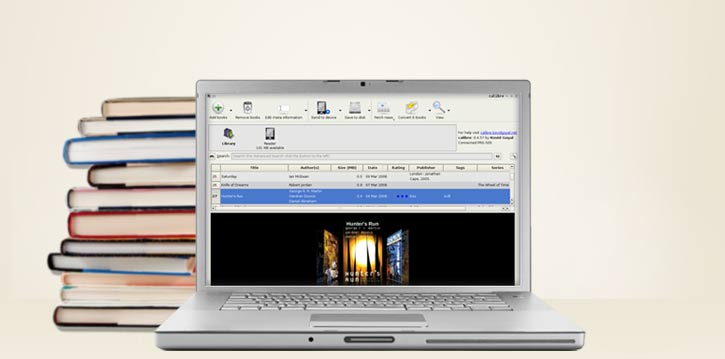
Available for Windows, macOS, and Linux, Calibre includes an eBook viewer, library management tools, metadata editing, and document conversion capabilities.
Its built-in reader supports adjustable layouts, fonts, bookmarks, and other useful features. Calibre can also run a content server, allowing books from a personal library to be accessed through a browser on compatible devices.
Calibre is particularly appropriate if you have hundreds or thousands of eBooks and want comprehensive library management.
For users who only need to open a single EPUB file quickly inside Chrome, a browser extension may be more convenient.
Can You Open EPUB Files Without Installing Anything?
Some websites offer online EPUB viewers where you can upload a book and read it directly in a web page.
Although this can be convenient for occasional use, there are important considerations.
First, check whether the website processes EPUB files locally in your browser or uploads them to a remote server. This matters especially when handling personal documents, unpublished manuscripts, or confidential materials.
Second, online viewers may have file-size limits, advertising, or fewer customization options than dedicated reading software.
Finally, an internet connection may be required each time you want to open the book.
If privacy and offline access are important, a local reader or browser extension that processes books on your computer is generally a more suitable choice.
Frequently Asked Questions
Can Google Chrome open EPUB files natively?
Chrome does not provide the same built-in EPUB reading experience as a dedicated eBook reader. Installing a compatible EPUB extension is a straightforward way to add this functionality.
Can I read EPUB files on Windows 10 or Windows 11?
Yes. You can use a Chrome EPUB reader extension or a desktop application such as Thorium Reader or Calibre.
How do I open EPUB files on a Mac?
You can open EPUB books through a compatible Chrome extension or use a dedicated macOS reading application. Apple Books is another option for supported EPUB files.
Can I listen to EPUB books instead of reading them?
Yes. EPUB readers with Text-to-Speech support can convert book text into spoken audio using available computer voices. 123 ePub Reader includes Listen & Follow for this purpose.
Are DRM-protected EPUB books supported?
Not by every reader. 123 ePub Reader and many browser extensions are intended for DRM-free EPUB files. For protected publications, you may need the official application provided by the bookstore or a compatible reader such as Thorium for supported Readium LCP books.
Final Thoughts: Which EPUB Reader Should You Choose?
The best EPUB reader depends on how you prefer to read digital books.
If you want a complete desktop library manager, Calibre is an excellent choice. If you need advanced accessibility features or support for certain protected publications, Thorium Reader deserves consideration.
However, if your goal is simply to open EPUB files on Windows or Mac directly in Google Chrome, 123 ePub Reader offers a convenient solution that combines everyday reading tools with text-to-speech and document conversion.
You can read complete books for free, customize the appearance of every page, navigate chapters, and export supported content into familiar document formats.
Start Reading EPUB Books in Chrome
Open, read, listen to, and convert your favorite EPUB books directly in your browser.
Get 123 ePub Reader for Chrome – Free
Available on the Chrome Web Store