
Every website imposes its own typography on you — tiny fonts, low contrast, cramped line spacing, typefaces that strain your eyes after five minutes. Most of the time there is nothing you can do about it. You cannot ask a news site to use a larger font. You cannot tell a blog to increase the space between lines.
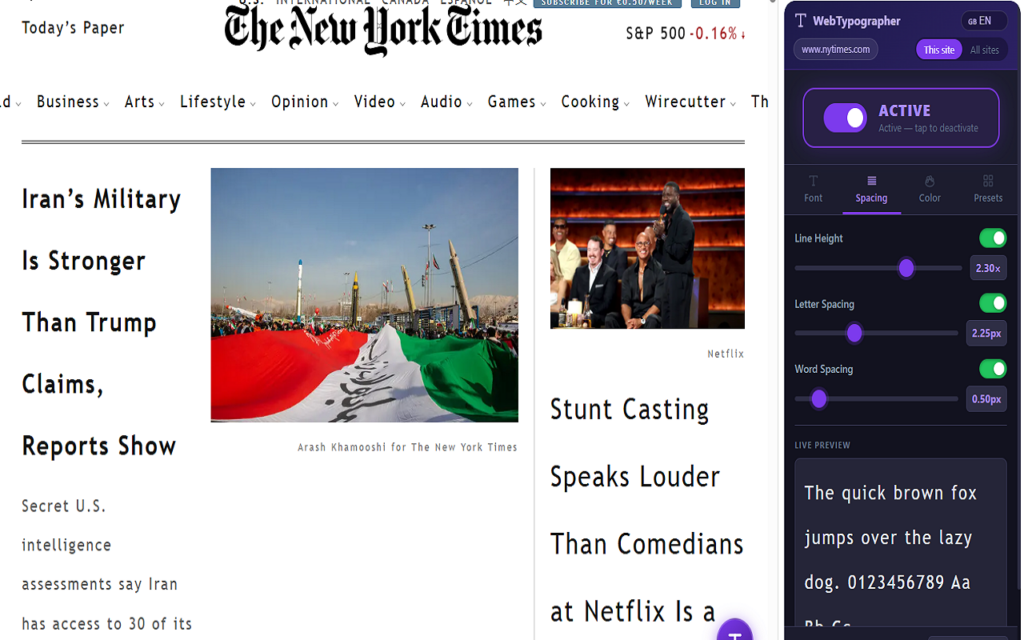
WebTypographer is a free Chrome extension that changes this. It opens as a sidebar alongside any webpage and lets you customise the typography in real time — font family, text size, weight, colour, line height, letter and word spacing — without reloading the page and without touching any settings.
Install WebTypographer — Free
What You Can Change
Font Family
Choose from over 30 fonts including the most popular Google Fonts — Roboto, Inter, Open Sans, Merriweather, Fira Code, OpenDyslexic and more — or paste any custom font URL to load a typeface from any source. The font loads on demand and applies to the page immediately.
Text Size — Proportional Scaling
Rather than forcing a fixed pixel size on every element, WebTypographer scales text proportionally using a percentage slider (from −50% to +100%). This means that if a heading is naturally twice the size of body text, it stays twice the size after scaling. The typographic hierarchy of the page is preserved.
Font Weight and Style
Switch between Light, Regular, Medium, Bold and Black with a single tap. Toggle italic on any website instantly.
Line Height, Letter Spacing, Word Spacing
Three independent sliders let you fine-tune the spacing of any page. Increasing line height alone can transform a dense, difficult-to-read article into something comfortable. Wider letter and word spacing is particularly effective for readers with dyslexia.
Text and Background Colour
Override the text colour and background colour of any site. A colour picker lets you choose any shade, and six ready-made palettes are available for quick access:
- Paper — dark text on a warm off-white background
- Dark — light text on a dark background
- Sepia — a soft greenish tone for reduced eye strain
- Blue — cool, low-stimulation palette
- Warm — amber tones for evening reading
- B&W — maximum contrast, black and white
Who Is It For?
WebTypographer was built for anyone who has ever found a website difficult to read. In practice, the people who benefit most are:
- People with dyslexia — the Dyslexia preset applies Open Sans at 18px with wide letter and word spacing in a single tap
- People with low vision — the Large Print preset switches to Bold at 22px with extra line height
- People with light sensitivity — dark mode and sepia palettes reduce screen glare
- Anyone who simply prefers a different reading experience — a personal font, a comfortable size, a less fatiguing colour scheme
The sidebar itself is designed to be large and clear. Controls are generously sized, labels are readable, and everything works without a mouse if needed.
Six Ready-Made Presets
For those who do not want to adjust every slider manually, six presets are available under the Presets tab:
- Readable — Georgia, 16px, relaxed spacing, warm paper background
- Dyslexia — Open Sans, 18px, wide letter and word spacing
- Large Print — Bold, 22px, tall line height
- Focus Dark — Inter, dark background, light text
- Monospace — Fira Code, 14px, code-style spacing
- Minimal — Lato, clean defaults, no colour change
Each preset applies in one tap and can then be further adjusted using the sliders.
Settings Are Saved Per Website
Once you configure a site, WebTypographer remembers your choices. Next time you visit, your typography preferences are applied automatically — no need to open the sidebar again. A small floating badge appears in the corner of pages you have customised, so you always know which sites are active. Clicking the badge reopens the sidebar instantly.
A global mode is also available: one set of settings that applies to every website at once, useful as a baseline that you can then override for specific sites.
Privacy
WebTypographer stores all preferences locally on your device using Chrome’s standard storage API. No data is ever sent to external servers. No account is required. The only external connection is to Google Fonts when you select a Google Font — and only if you do.
How to Install
WebTypographer is available free on the Chrome Web Store. Click the button below, then click Add to Chrome. The extension icon will appear in your toolbar — click it to open the sidebar on any page.
Install WebTypographer — Free
Available in English, Italian, Spanish, French and German. The interface language is detected automatically from your browser settings and can be changed at any time from within the extension.